Seed

SEED Admin

Your private administrative agent

Your life. Less paperwork.

The insurance claim. The tax return. The contract you need to understand. Bring your records, questions and next steps together, with a specialist AI that works from your private vault.

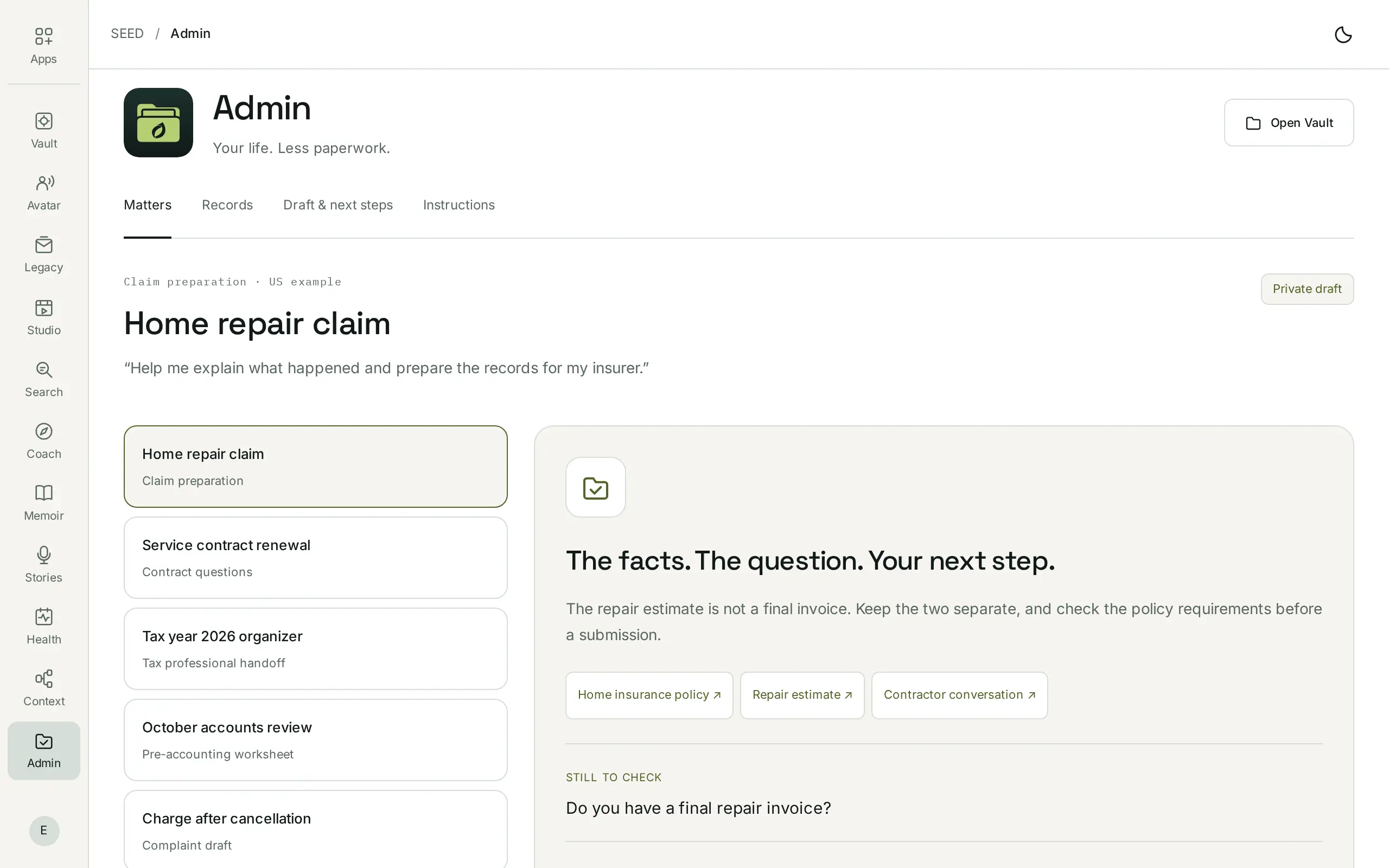
SEED Admin open in the SEED dashboard on a computer, with example records: the Home repair claim matter, its home insurance policy, repair estimate and contractor conversation, and the question still to check, “Do you have a final repair invoice?”
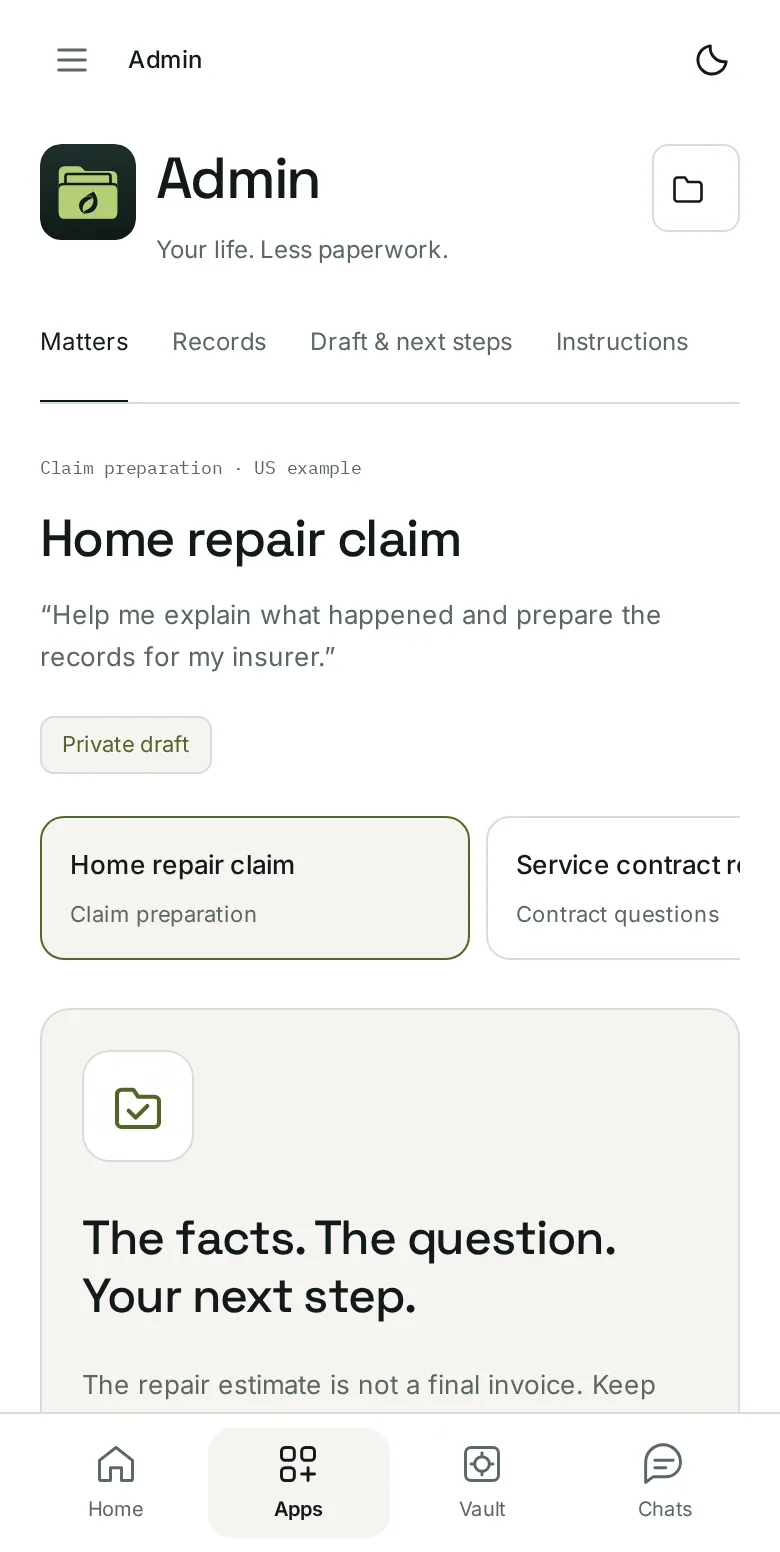
SEED Admin open in the SEED dashboard on a phone, with example records: the Home repair claim matter, a private draft, and the tabs Matters, Records, Draft & next steps and Instructions.
  • A specialist’s workflowFocused questions and tools for the task
  • Sources stay attachedEvery fact keeps its original one click away
  • Private AICore processing in your private environment
  • You choose the next actionSending, filing, signing and paying stay separate

The work behind the paperwork

For the things life asks you to handle.

A policy in one inbox. A receipt on your phone. The answer somewhere in a conversation. Admin brings the useful parts together and helps you work through what comes next.

01 / Insurance

Build a stronger record of your claim.

Bring together the policy, damage records, estimates and correspondence. Understand the insurer’s requests, keep a timeline and prepare the facts behind your claim.

You bring

  • The policy
  • Damage records and estimates
  • Correspondence with the insurer

You leave with

  • A timeline of the claim
  • The insurer’s requests, explained
  • The facts behind your claim, with sources

Admin is not an insurance adjuster. Accepting a settlement is your own, separate decision.

02 / Contracts & legal issues

Know what the document actually says.

Read a lease, compare contract versions or reconstruct an agreement. See the exact clauses, the changes and the questions to bring to an attorney.

You bring

  • A lease or contract
  • Earlier versions
  • The messages around an agreement

You leave with

  • The exact clauses that matter
  • What changed between versions
  • Questions for an attorney

Admin is not your attorney. Signing stays a separate action you authorize.

03 / Tax preparation

Make tax season less of a scavenger hunt.

Organize W-2s, 1099s, receipts and prior returns by tax year. Spot missing documents and prepare a clear handoff for your tax professional or a supported filing service.

You bring

  • W-2s and 1099s
  • Receipts
  • Prior returns

You leave with

  • Records organized by tax year
  • A list of what’s missing
  • A handoff for your tax professional

Admin is not a CPA. Filing depends on supported federal and state coverage and your separate authorization.

04 / Accounts & bookkeeping

See the story behind the numbers.

Match selected statement entries to receipts and invoices. Review partial payments, missing paperwork and personal or business use before handing records to your accountant.

You bring

  • Selected statement entries
  • Receipts and invoices
  • Supported statement exports

You leave with

  • Entries matched to their paperwork
  • Partial payments and gaps, flagged
  • Records ready for your accountant

Reading a statement doesn’t authorize a payment or a change to your books.

05 / Consumer disputes

Explain the problem. Back it with the record.

A charge after cancellation. A service that wasn’t delivered. Rebuild the sequence, find the relevant messages and draft a focused complaint you can review.

You bring

  • The charge or the order
  • Your cancellation or request
  • The messages that followed

You leave with

  • The sequence of what happened
  • The messages that support it
  • A focused complaint to review

Nothing is sent for you. Sending the complaint is a separate action.

06 / Everyday admin

Arrive prepared. Keep the follow-through.

Work through forms, appointment checklists, renewals and household paperwork. See what you have, what’s missing and the next step to take.

You bring

  • Forms and renewals
  • Appointment details
  • Household paperwork

You leave with

  • What you have
  • What’s still missing
  • The next step to take

Admin prepares; you decide what happens next.

Your AI, with a specialist’s workflow

It knows the task. It works from your records.

Every SEED app gives your private AI a particular job. Admin brings administrative expertise, focused questions and task-specific tools to the documents you choose. It can tell an estimate from an invoice, keeps questions open when evidence is missing and turns a long exchange into a useful brief.

  1. 01

    Start with the outcome.

    “Prepare my claim.” “Explain this contract.” Your agent shapes the work around what you need to do.

  2. 02

    Find the relevant evidence.

    Use selected files and supported exports from your vault. The source, date and version stay attached to the facts.

  3. 03

    Ask what’s missing.

    A final invoice? The right tax year? A cancellation acknowledgement? Answer the questions that move the matter forward.

  4. 04

    Prepare the next step with you.

    Review the draft, check its sources and choose what to export or share. Sending, filing, signing and paying are separate actions.

Your Admin workspace

The matter and its originals, together.

Choose a matter, inspect its records and prepare your next step. Admin keeps the evidence, the open questions and the reviewed draft in one place, under four tabs.

  1. Matters

    One for each thing you’re handling: a home repair claim, a service contract renewal, a tax year organizer, an accounts review, a charge after cancellation or an appointment checklist.

  2. Records

    Open the originals behind the matter and choose which ones it uses. The draft works only from the records you check; the originals stay in your vault.

  3. Draft & next steps

    The facts, the question still to check and your next step. A repair estimate is not a final invoice, so Admin keeps them apart and asks for what’s missing. Change the evidence and the draft needs a new review.

  4. Instructions

    How Admin works with you, in your own words. Edit them whenever you like.

Review and download your packet. Nothing is filed, sent, signed or paid.

A woman at her kitchen table working through letters and documents from an open box

The next time, the history is there

Keep the whole matter. Stop starting over.

Keep the original letter, the version you reviewed, the questions still open and the reply that arrives next. Return to the same matter and continue from where you left off.

  1. The question

    “Can you help me explain what happened?”

  2. The draft you checked

    Your account, selected evidence and open questions.

  3. The actual receipt

    Proof of what was submitted, when and to whom.

  4. The next reply

    Bring it back to the matter. Prepare your next step.

PreparedSubmittedAccepted

Different states, kept apart, for a clearer picture. One receipt can support your home records, a claim and an accounting question; each task uses only the selection you allow, and the original stays in your vault.

Your private vault is the foundation

Bring the intelligence to your paperwork.

Admin works inside your SEED private server environment, with privately hosted AI. SEED manages the infrastructure. You choose the records each task can use.

Inside your private environment

Documents Statements Receipts Contracts
Your Admin specialistSelected records and a focused workflow

Your explanation, draft or organized packet

Only when you choose
A recipient you select An attorney, accountant, insurer or supported outside service. Review exactly what they receive.
  1. 01

    Your records stay out of external model APIs.

    Core processing runs in your private environment. Your records are not used to train models or for advertising.

  2. 02

    Every outside action is its own authorization.

    Preparing a draft shares nothing. Sending a message, filing a return, signing, paying or accepting a settlement each needs its own approval, after you review the text, the records and the recipient.

  3. 03

    An outside AI is optional.

    It receives only the records you specifically choose for it, under its own terms.

How your data is handled
Two people talking across a table, a notebook between them

Better prepared for the right help

Give your professional a useful starting point.

Bring an attorney a clear chronology. Give a tax preparer an organized year. Show an accountant the entries you could not resolve. The facts, the questions and the originals behind the summary.

Admin helps you understand and prepare. A licensed professional provides regulated advice or representation when it’s needed. You choose the recipient and review the package before sharing.

What Admin won’t do

Admin prepares and explains. These stay with you, or with the professional you choose.

  • Act as your licensed attorney, CPA or insurance adjuster.
  • Send, file, sign, pay or accept a settlement without your separate authorization.
  • Submit anything because it’s prepared. A packet stays a draft until you act.
  • Treat an AI draft as final. Check scanned numbers, deadlines and incomplete documents against the original.
  • Promise every state procedure, tax form or institution. Laws, insurance processes and tax rules vary by state and situation; supported filing and account connections are confirmed with your access.

Part of SEED

The same private home. A specialist for the task.

Your vault holds the originals. Each app puts the records you choose to work in a different way. You don’t need to organize your whole life or use every SEED app first.

  • SEED Vault

    Keep the originals and their context. Admin works from a selection and leaves the original preserved in your vault.

    Explore Vault
  • SEED Search

    Find and organize the records you need. Admin uses the relevant selection to work through a particular matter.

    Explore Search
  • SEED Context

    Choose what an outside assistant receives. Review exactly what goes, and only if you approve.

    Explore Context

Pricing

Start with the thing on your mind.

Begin with a claim, a contract, your tax records or a stack of receipts. Admin is $9.99 a month on its own, or included with Personal.

SEED Free

$0to get started

A private home for the records Admin works from.

  • 5 GB private vault
  • Upload and import your files
  • Private AI for organizing, Search and Stories
Explore vault plans

Personal

$29.99/ month

Room for your whole life.

  • 1 TB private vault
  • Studio, Avatar, Coach, Health, Context, Admin and Legacy subscriptions
  • $69.93 / month if bought one by one
Explore Personal

Prices in USD; applicable taxes are additional. Your core private AI has no per-request model charge within your plan and app access. Optional external models and professional or filing services have their own terms and any applicable charges.

Before you start

A few useful answers.

Is Admin a separate SEED app?

Yes. Admin is the specialist app for insurance, contracts, tax preparation, accounts and everyday paperwork. Search finds and organizes your records; Admin uses the relevant selection to work through a particular matter. Your apps share the same private home.

What makes its agent a specialist?

Admin gives your private AI task-specific knowledge, questions, workflows and tools. It works through a claim differently from a tax dossier. It checks which evidence is present, keeps uncertainty visible and prepares a result you can inspect.

Can Admin file my taxes or act as my lawyer?

Admin helps organize US tax records, prepare questions and work toward a reviewed return through a supported filing route. Actual filing depends on supported federal and state coverage, the filing service and your separate authorization. Admin does not act as your licensed attorney, CPA or insurance adjuster. Advice and representation require the appropriate professional.

Does it automatically connect to my bank?

Start with selected files and supported statement exports. Live bank and accounting connections depend on the providers and permissions available with your access. Reading a statement does not authorize a payment or a change to your books.

Can I check the original behind an answer?

Yes. Open the linked original, check the relevant date, amount or clause, and correct the interpretation. An AI draft is something to review, especially when a scanned number, a deadline or an incomplete document matters.

Will anything be sent without me?

No. Preparing a draft shares nothing. Review the text, the exact records and the recipient before choosing a supported external action. Sending a message, filing a return, signing, paying or accepting a settlement each requires its own authorization.

What happens if I use an outside AI?

Core Admin work stays in your private environment. An optional outside model or assistant receives only the records you specifically choose for it, under its own terms. A supported ChatGPT connection follows its plan and permissions; ChatGPT subscriptions and API billing are separate.

Where is Admin launching?

In the United States only, for now. Relevant workflows need your state, tax year, legal entity and situation. US access does not mean every state procedure, tax form or institution is supported.

What happens when I join?

You join SEED with your email and get Admin updates. When your access is ready, Admin is $9.99 a month on its own, or included with Personal. No subscription starts here. Please don’t send legal, tax, identity or financial records through the signup form.


A little less paperwork. A lot more clarity.

Bring the next thing you need to handle.